Docs › User › Cloud & Infrastructure
☁ Cloud & Infrastructure
Browse live cloud resources, generate Terraform modules, validate and apply infrastructure, and manage Kubernetes clusters — all from within Oryn.
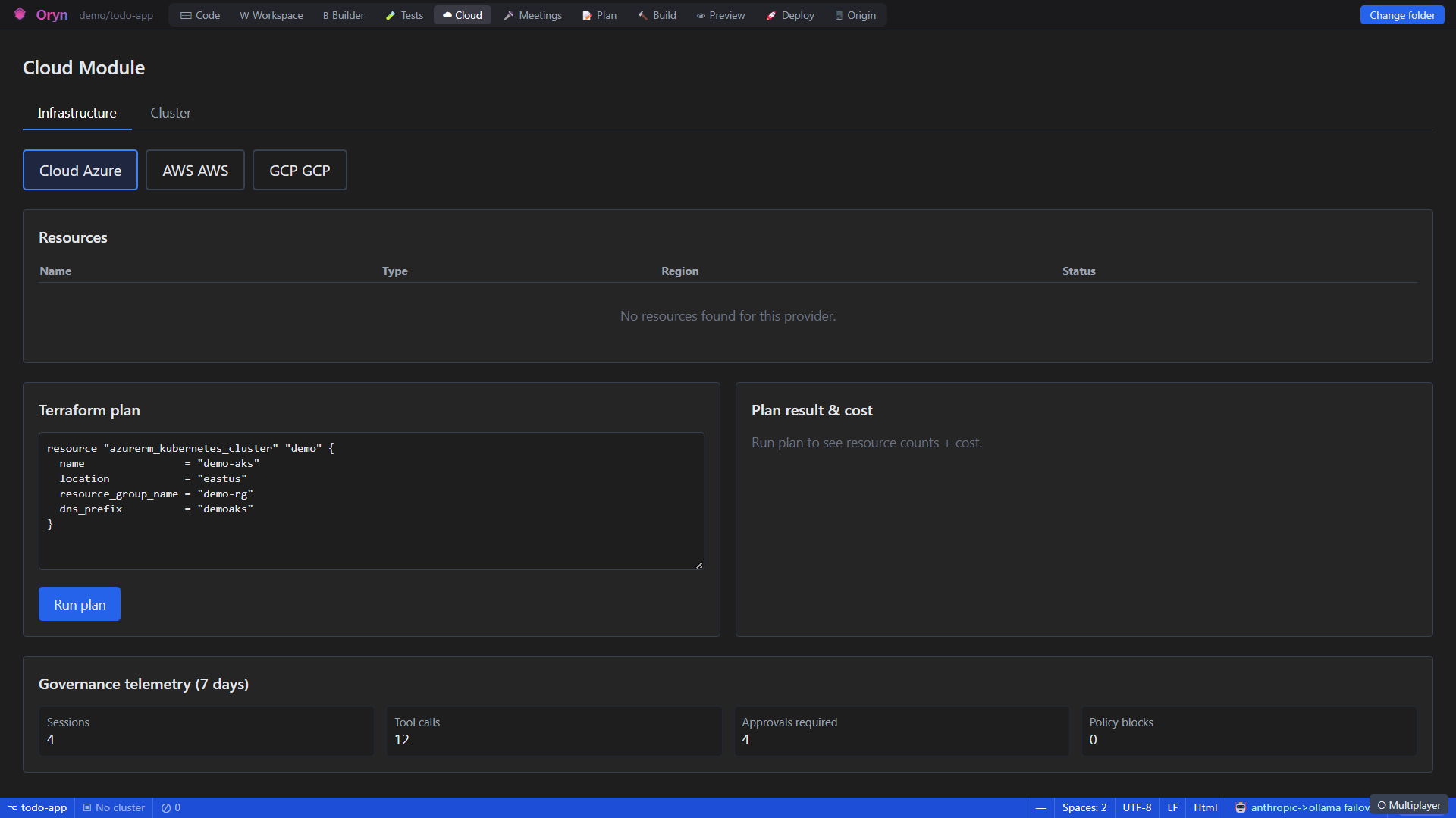
Overview
The Cloud & Infrastructure area connects Oryn to your AWS, Azure, and GCP environments so you can inspect live resources, generate ready-to-use Terraform (IaC) modules, scaffold CI/CD pipelines, and interact with Kubernetes clusters — without leaving the desktop app. It also provides a library of over 60 pre-built diagnostic checks covering security, cost, reliability, compliance, and more. The goal is to shorten the distance between writing code and actually running it in production.
How it works
The backend is built around a pluggable ICloudAdapter abstraction: one adapter per cloud provider (AWS, Azure, GCP) exposes resource listing, Terraform plan, cost estimation, and apply operations. When you request live resources, Oryn first attempts native SDK calls (AWS SDK for .NET, Azure Resource Manager, Google Cloud client libraries) with an 8-second cap, then falls back to the provider's CLI (aws / az / gcloud) if the SDK path is unavailable. Terraform operations follow a plan-then-approve gate — an apply is blocked until you explicitly confirm, and the action is audit-logged with a correlation ID. Kubernetes access is provided by a dedicated kubectl-mcp MCP server that runs over stdio JSON-RPC, routing nine kubectl operations (get, describe, logs, apply, delete, exec, scale, rollout, top) through the local kubectl binary with strict input validation to prevent flag injection. The Infra panel in the desktop UI renders HCL and YAML files in Monaco Editor so you can review generated modules and pipelines before anything touches disk.
What you can do
Multi-cloud resource browserList live resources across AWS, Azure, and GCP — covering 40+ resource types per provider — using SDK or CLI credentials already on your machine.
Provider status & capability checkSee at a glance which cloud providers are connected, which operations (resource listing, plan, apply) are available, and what credentials or CLIs are missing.
Terraform plan & cost estimateSubmit HCL to a provider adapter and get back a Terraform plan (resources added, changed, destroyed) plus a cost estimate before applying.
Approval-gated Terraform applyApply a previously created plan only after explicit approval; the apply is rejected with a clear error if approval is missing, and each apply is recorded in the audit log.
IaC module generationGenerate Terraform modules (main.tf, variables.tf, outputs.tf) for Azure, AWS, or GCP tailored to your project name, environment, and region, covering the canonical Oryn stack: app host, database, secret store, and observability.
IaC validationRun terraform validate and plan against an existing infra directory to surface issues, planned changes, and detected configuration drift.
CI/CD pipeline scaffoldingGenerate pipeline definitions for GitHub Actions, Azure DevOps, and GitLab CI simultaneously, with an optional Oryn readiness-gate (ORP score) to block deploys below a configured threshold.
Infrastructure previewLoad a combined preview of the generated Terraform modules, all CI/CD pipelines, and the current ORP deployment gate decision for your project in one request.
AI diagnostic checksBrowse a catalog of 60+ checks across Security, Cost, Reliability, Performance, Compliance, Networking, Data, Identity, Container, and Observability categories, then run them against a target resource.
Kubernetes cluster panelView live pod status (name, namespace, ready count, phase) from your current kubectl context directly in the desktop sidebar, with a one-click refresh.
kubectl MCP toolsThe AI agent can get, describe, stream logs, apply manifests, delete resources, exec into pods, scale deployments, manage rollouts, and view resource usage (top) via the built-in kubectl-mcp server.
Air-gapped SDK bypassSet ORYN_DISABLE_CLOUD_SDK=1 to skip native SDK probes entirely, forcing the CLI fallback path — useful when metadata-service endpoints would hang in restricted networks.
How to use it
- Check which providers are connected
Open the Cloud section in Oryn. The provider status endpoint reports whether resource listing, Terraform plan, and Terraform apply are available for each cloud, along with any missing CLIs or credentials. - Browse live resources
Select a provider (aws, azure, or gcp) and a resource type (for example, ec2-instance or aks-cluster). Oryn first tries your configured SDK credentials, then falls back to the aws / az / gcloud CLI. Results show up to 100 resources with ID, name, region, and tags. - Generate Terraform modules
Open the Infrastructure & CI/CD panel for your project, pick a cloud target (Azure, AWS, or GCP), and click Generate. Oryn produces main.tf, variables.tf, and outputs.tf covering your app host, database, secret store, and observability resources. Use the Monaco editor to review the HCL before saving. - Validate existing infrastructure
Switch to the Validate tab, enter the path to your infra directory (for example, infra/azure), and click Run terraform validate + plan. Oryn reports any issues by severity, the planned changes, and resources that have drifted from the state file. - Plan and estimate cost before applying
Submit your HCL to get a Terraform plan that lists resources to add, change, or destroy, together with a cost estimate. Review both outputs in the panel before proceeding. - Apply with explicit approval
When you are ready, approve the plan. Oryn enforces an approval gate — the apply is blocked until you confirm. On success the applied resources are listed and the action is written to the audit log with a timestamp and correlation ID. - Scaffold CI/CD pipelines
Switch to the CI/CD tab and click Generate. Oryn produces pipeline files for GitHub Actions, Azure DevOps, and GitLab CI at once. You can configure the primary branch, container registry, and an optional ORP readiness score gate that blocks deploys below 80 by default. - Inspect your Kubernetes cluster
Open the Cluster panel. Oryn probes kubectl on port 7001; if kubectl is installed and a cluster context is active, you see a live table of pods with name, namespace, ready count, and phase. Click Refresh to update. - Run AI diagnostic checks
Browse the 60+ diagnostic catalog (Security, Cost, Reliability, and more) to find relevant checks for your resources. Run a check against a specific provider, resource type, and resource ID to receive findings — requires configured provider credentials.
Example
You are working on a new service called "payments-api" and want to stand up its Azure infrastructure. In the Infrastructure & CI/CD panel you select Azure as the cloud target and click Generate. Oryn immediately produces three files — infra/azure/main.tf, infra/azure/variables.tf, and infra/azure/outputs.tf — that define a resource group, Key Vault with purge protection, Application Insights, SQL Server and database (TLS 1.2 minimum), a Linux App Service (P1v3), and an AKS cluster with a 2-node default pool and a system-assigned managed identity. The Monaco editor opens on main.tf so you can scan the HCL. Oryn also shows a confidence score of 85 and an effort estimate of "1-2 dev-days to review, plug secrets, and run first apply", along with three recommendations: pin Terraform provider versions, wire output secrets into Key Vault references, and enable remote state with locking before team use. You switch to the CI/CD tab and generate GitHub Actions, Azure DevOps, and GitLab CI pipelines in one click, all gated on an ORP readiness score of 80.
Admin notes
Provider credentials are picked up from the environment automatically: IAM roles or ~/.aws/credentials for AWS, DefaultAzureCredential (environment variables, managed identity, Azure CLI) for Azure, and Application Default Credentials (GOOGLE_CLOUD_PROJECT / GCP_PROJECT environment variable required) for GCP. Set ORYN_DISABLE_CLOUD_SDK=1 to skip SDK probes and force the CLI fallback — recommended for air-gapped or heavily restricted networks where the SDK's metadata-service calls would hang. The CLI whitelist is intentionally narrow: only specific resource types and fixed argument patterns are allowed, preventing an AI-driven query from being coaxed into arbitrary CLI flags. Terraform apply requires an explicit approval field in the request body; any apply attempted without it returns a 409 Conflict with an approvalGate identifier that should be surfaced to the user. Kubernetes access requires kubectl to be installed and a cluster context to be active on the machine running the Oryn agent — the agent exposes kubectl on localhost:7001 with no license guard. Live log streaming and on-demand diagnostic execution both require configured provider credentials; without them, calls return a 503 with a clear evidence message and no synthetic data.
Related