Docs › User › Models & Providers
🧠 Models & Providers
Choose from 30+ models across every major AI provider — or let Oryn auto-route to the right one for each task.
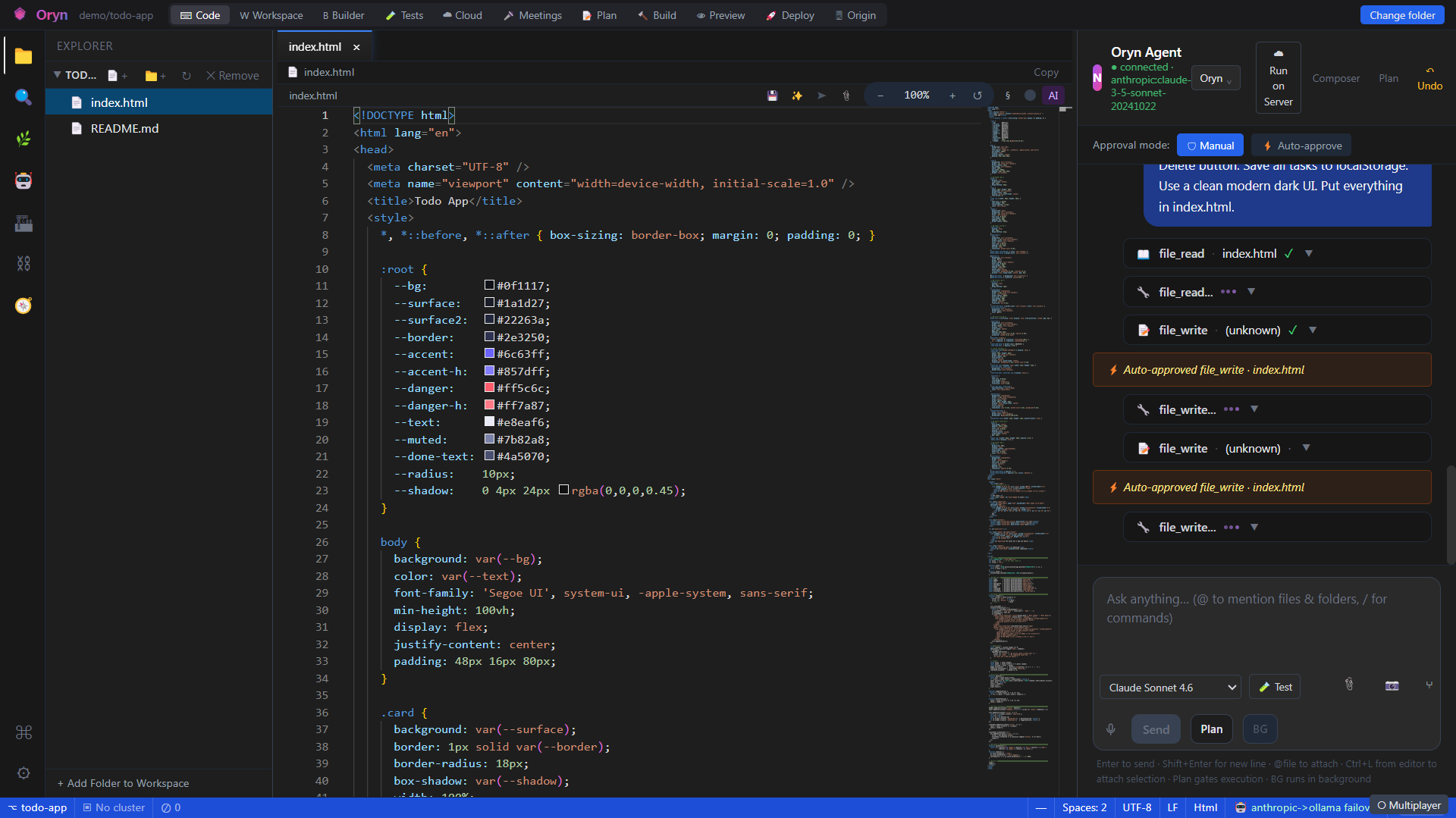
Overview
Oryn connects to a broad roster of AI models spanning multiple cloud providers and local inference, all configured with your own API keys. You can pin a specific model for a session, let the Auto router pick intelligently based on what each task needs, or configure a cloud-then-local failover so work continues even without an internet connection. Every model in the registry is always visible in the dropdown; a model whose key is not yet configured simply fails at call time with the provider's own auth error rather than being hidden.
How it works
At startup the backend's ModelRegistry populates a full catalog of models unconditionally — covering direct cloud endpoints, Azure AI Foundry surfaces, and a curated Ollama list — then a live scan of the local Ollama daemon upserts any models you have actually pulled. When a message is sent, ChatModelFactory inspects each registered model's ModelProtocol tag (Anthropic Messages API, OpenAI Chat Completions, Azure Native, Azure Responses, Gemini, or Ollama) and constructs the correct HTTP client and auth-header shape for that provider. If you select "Auto" (or leave the model picker blank), the ModelRouter matches the task type — code generation, reasoning, long-context, vision, quick reply, etc. — against capability flags advertised by each registered model, then picks the best available candidate using a preferred-family ordering. The ModelResolver caches built model clients per model id so repeated turns in the same session do not rebuild HTTP clients.
What you can do
30+ model catalogA single registry covers Claude Opus/Sonnet/Haiku, GPT-5 family, Grok, Gemini, Kimi, GLM, DeepSeek, Llama via Groq, and Ollama cloud/local models — all visible in the picker at once.
Bring Your Own Key (BYOK)Each provider has its own key slot (AnthropicApiKey, OpenAiApiKey, XaiApiKey, GlmApiKey, GeminiApiKey, AzureFoundry key) in appsettings; you supply only the keys for providers you want to use.
Task-based auto-routingSelecting 'Auto' lets the ModelRouter pick the best registered model per task type: code generation prefers the Claude/GPT-5/Grok families with the Code capability; quick replies pick fast/cheap models; reasoning tasks pick models advertising chain-of-thought; vision tasks require image-input capability.
Per-session model pinningThe model picker in the Chat panel persists your choice to localStorage; every message in that session is sent via SendPromptWithWorkspaceModel so the backend always uses the pinned model, bypassing Auto routing.
Azure AI Foundry multi-surface supportFour separate Foundry endpoint slots (Azure Native, Azure Responses, OpenAI-compatible, Anthropic-compatible) each register their own model subset; the correct wire protocol is detected automatically from the endpoint URL and model id.
Local / offline inference via OllamaAny model pulled in a local Ollama daemon is discovered at startup via /api/tags and added to the registry; the Ollama protocol uses a simpler /api/chat payload with no API key required.
Cloud-then-local failoverSetting Provider to 'hybrid' or 'cloud-then-ollama' wraps the primary cloud model in a FailoverChatModel that switches to the local Ollama model if the cloud call fails or times out (default 12 s, tunable via ORYN_LLM_PRIMARY_TIMEOUT_SECONDS).
Live registry rebuild without restartUpdating Azure Foundry endpoint configuration triggers RebuildFrom, which clears and re-registers the default catalog live; Ollama entries are snapshotted and restored so locally-pulled models survive the rebuild.
Model test buttonThe Chat panel includes a test action that posts to /api/v1/llm/test and reports the provider, resolved model id, and a sample reply — confirming your key and endpoint are working before you start a real task.
Failover transparencyWhen a cloud stream fails mid-response and falls over to the local model, Oryn injects a visible inline notice ('Switched to local offline model after cloud connection failed.') so you always know which model finished the reply.
How to use it
- Open Settings and enter your API keys
Navigate to Settings > LLM / Models. Add keys for the providers you want: your Anthropic key goes in AnthropicApiKey, your OpenAI key in OpenAiApiKey, your xAI (Grok) key in XaiApiKey, and so on. You only need keys for providers you plan to use. Azure Foundry users configure one shared key plus one or more endpoint URLs for the Foundry surfaces they have access to. Gemini users add a GeminiApiKey. For local Ollama, no key is needed — just make sure Ollama is running. - Pull any local models you want (Ollama only)
If you want offline/local inference, open a terminal and run 'ollama pull <model-name>' for any model you want available (for example, 'ollama pull qwen2.5-coder'). Oryn scans /api/tags on startup and adds every pulled model to the registry automatically. You can override the Ollama endpoint via the OLLAMA_ENDPOINT environment variable if your daemon runs on a non-default port or host. - Verify your setup with the model test
In the Chat panel, open the model picker dropdown and select the model you want to test. Click the test button (shown next to the picker). Oryn sends a short probe request and shows the resolved provider name, model id, and a sample reply — or a clear error message if the key or endpoint is wrong. - Pick a model or use Auto
Use the model picker dropdown in the Chat panel to pin a specific model for the session. Models are grouped by provider family (claude-4, gpt-5, grok, gemini, ollama, etc.) and sorted alphabetically within each group. Leave the picker on 'Auto' (blank selection) to let the router choose the best available model for each task automatically. Your selection is saved to localStorage and persists across restarts. - Send your prompt
Type your prompt and press Enter. If you pinned a model, the backend's ModelResolver looks up the entry in the registry, constructs the right HTTP client for that provider's wire protocol, and routes your message directly to that model. If Auto is selected, the ModelRouter classifies the task, filters the registry by the required capability flags, and picks the top candidate from the preferred family ordering before dispatching. - (Optional) Enable failover for offline resilience
To have Oryn automatically continue with a local model when the cloud is unreachable, set Provider to 'cloud-then-ollama' (or 'hybrid') in settings. The primary cloud model gets a 12-second timeout; if it fails or times out, the request continues on Ollama and an inline notice appears in the chat. You can tune the timeout by setting the ORYN_LLM_PRIMARY_TIMEOUT_SECONDS environment variable (3–120 seconds).
Example
You are working on a large TypeScript codebase and want the best code-focused model, but you also want a fast fallback if the cloud is down. You set Provider to 'cloud-then-ollama' and leave the model picker on Auto. You type: "Refactor the ModelRegistry class to support async model discovery." Oryn's ModelRouter classifies this as a CodeGeneration task (requires the Code capability flag) and picks claude-opus-4-8 from the claude-4 family because it is the highest-ranked Code-capable model registered. The request streams back through the Anthropic Messages API. Later, you disconnect from Wi-Fi and send another refactor prompt. This time the Anthropic call times out after 12 seconds; FailoverChatModel silently switches to your locally-pulled Ollama model, and you see the inline notice "Switched to local offline model after cloud connection failed." — the task completes without interruption.
Admin notes
API keys are read from appsettings.json (LLM section) or environment variables and are never logged or returned by any API endpoint. The AzureFoundryConfig shape has four independent endpoint slots (AzureNativeEndpoint, AzureResponsesEndpoint, OpenAiCompatibleEndpoint, AnthropicCompatibleEndpoint) all authenticated by a single AzureFoundryApiKey; configure only the slots whose Foundry deployments you have provisioned — unused slots are silently skipped during registration. The Ollama endpoint defaults to http://localhost:11434 and can be overridden via the OLLAMA_ENDPOINT environment variable or the LLM__Ollama__Endpoint config key. The primary failover timeout defaults to 12 seconds and is adjustable via ORYN_LLM_PRIMARY_TIMEOUT_SECONDS (3–120). Models whose keys are not configured still appear in the picker; they will fail at call time with the provider's own auth error rather than a silent no-op — this is intentional so the full roster is always discoverable. The ModelRegistry supports live reload: posting updated Foundry endpoint config triggers RebuildFrom without a service restart.
Related